Most companies have at least one system that was built years ago and still runs something important. It keeps working, so it keeps being postponed.
The cost does not show up as one big failure. It shows up as slower releases, bigger support bills, workarounds and ideas that never ship because the old system cannot handle them. This guide covers why that matters for growth, what modernization gives you and how to approach it without stopping the business.
What is legacy application modernization?
It means updating, rebuilding or replacing old software so it performs better, stays secure and works with modern technology. The aim is to keep what is valuable in the system, such as its business rules and its data and remove what holds it back.
Depending on the system that can mean moving it to the cloud, cleaning up the code, rebuilding some modules, giving it a new interface or connecting it to newer tools through APIs.
Why legacy systems become a business challenge?
Old systems rarely fail overnight. The problems build slowly until the cost of keeping the system going is higher than the cost of changing it.
Rising maintenance costs
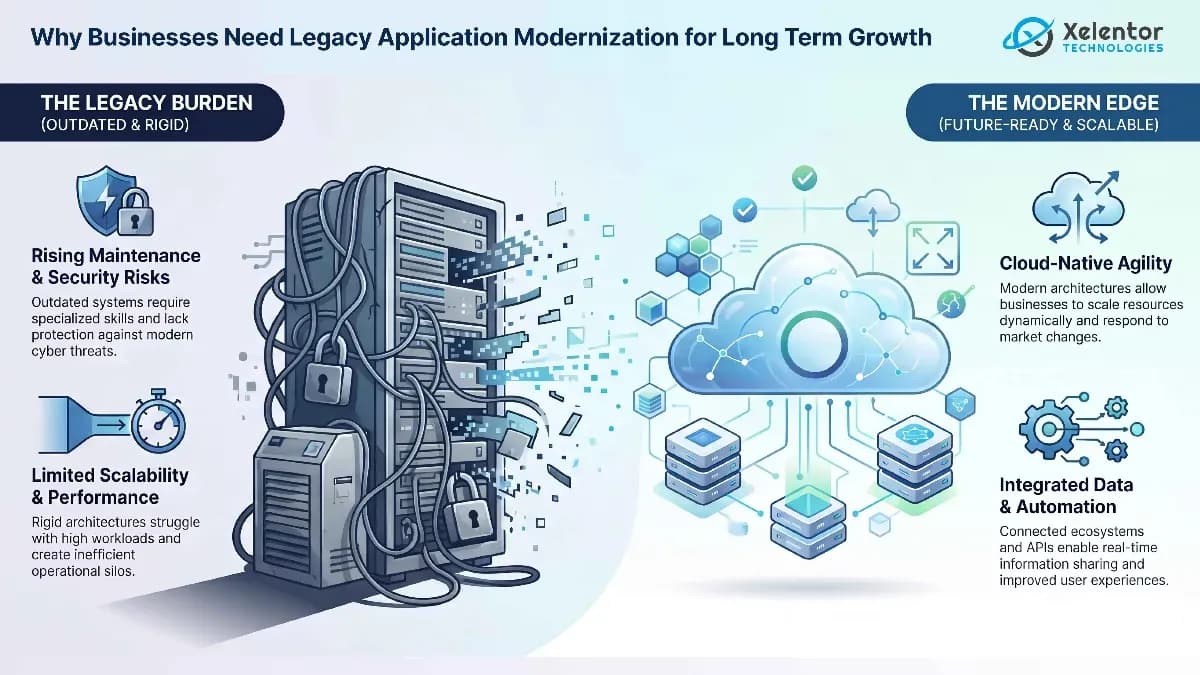
Older systems need skills that get harder to find, so support and development cost more each year. Money goes into keeping things running instead of improving the business.
Security and compliance risks
Unsupported software stops receiving security patches. Healthcare, finance, manufacturing and telecom all face strict rules on data protection and old systems often lack modern authentication, encryption and audit trails.
Limited scalability
Many older systems were designed for far fewer users and far less data. Scaling them often means expensive infrastructure and still ends in slow performance.
Poor integration capabilities
Your CRM, payment gateway, mobile app and analytics tools all need to share data. Systems built before APIs became standard cannot do that without custom work, so people copy data by hand.
Reduced productivity and user experience
Slow screens, clumsy interfaces and manual workarounds cost staff time every day and frustrate customers who use the system.
Benefits of legacy application modernization
Improved business agility
New features and integrations become routine instead of risky, so you can respond to the market faster.
Enhanced security and compliance
Current technology gives you stronger protection and makes it easier to meet industry requirements.
Better performance and reliability
Modern architectures respond faster and handle failures better, so critical operations stay stable.
Lower long-term operational costs
Modernization needs an upfront investment. Over time it usually cuts the cost of maintenance, infrastructure and workarounds.
Support for cloud and digital transformation
Modern applications are easier to run in the cloud, connect to analytics and automation and use with AI.
Common legacy modernization approaches
The names vary but the main routes are these. Our guide to upgrading, rebuilding or replacing a legacy system explains how to choose between them.
Rehosting
Moving the application to new infrastructure or the cloud with few code changes. It is the quickest route and changes the least.
Refactoring
Improving the internal structure of the code without changing what the software does.
Replatforming
Moving to a newer platform with targeted changes to improve scalability, performance or integration.
Rebuilding
Creating a new application on modern technology that keeps and improves the old one's functions. It gives the most flexibility and takes the most time and money.
Replacing
Retiring the old system for a ready-made or custom-built one that fits the business better.
The cost of waiting
Doing nothing is a decision with a cost. Maintenance takes a growing share of the budget, security gaps stay open, integrations stay manual and every new idea has to work around old limits. The cost is often hidden because it is spread across many small delays and workarounds.
How to build the business case
- Measure what the current system costs each year, including support, hosting, workarounds and lost time
- List the business goals the system blocks, such as faster releases, new channels or AI features
- Estimate the risk of staying put, including security and compliance exposure
- Compare routes: upgrade, rebuild or replace
- Phase the work so early steps deliver value while later ones are planned
For help choosing a route, read upgrade, rebuild or replace. If replacement looks likely, see why businesses are replacing legacy systems for how those projects run.
How to build a successful modernization strategy
Start with an honest assessment of what you have: the architecture, the dependencies, the integrations, the security gaps and the problems staff complain about. Then set clear business goals so you know what better looks like.
Prioritize by business impact. Fix the system that hurts most first and modernize in steps, so the business keeps running while the work happens. An experienced partner can help with architecture choices, migration planning and testing, but you should still own the priorities.
Legacy modernization and long-term business growth
Companies that stay on outdated systems find it harder to launch new products, connect to new channels and use analytics or AI. Companies that modernize on their own schedule can adopt those things when they choose, not when a failure forces the issue.
That is the real return. It is less a saving on one bill than the freedom to keep building.
Conclusion
Legacy applications can keep supporting the business for a long time, but they often limit growth, security and speed. Modernizing them in sensible steps lowers risk, cuts long-term cost and gives the business room to grow.
Frequently asked questions
What is legacy application modernization?
Legacy application modernization is the process of updating, transforming or replacing outdated software applications to improve performance, security, scalability, maintainability and compatibility with modern technologies and business requirements.
Why do businesses need legacy application modernization?
Businesses need modernization to reduce maintenance costs, improve security, support scalability, enable cloud adoption, integrate with modern systems and support digital transformation initiatives that drive long-term growth.
What are the signs that a legacy application should be modernized?
Common signs include frequent downtime, slow performance, increasing maintenance costs, security vulnerabilities, limited integration capabilities, lack of scalability, unsupported technologies and user dissatisfaction with outdated interfaces.
What are the main approaches to legacy modernization?
The main approaches include rehosting, refactoring, replatforming, rebuilding and replacing the existing application. The best approach depends on business goals, technical complexity, budget and desired long-term outcomes.
Does legacy modernization always require replacing the entire application?
No. Many modernization projects involve incremental improvements such as cloud migration, API integration, code refactoring or modular replacement of specific components rather than a complete application rebuild.