Most companies have a system that nobody wants to touch. It runs the orders or the billing or the customer records. It works, mostly, so it stays.
The trouble is that software does not have to break to become a problem. It gets more expensive to change, harder to connect to anything new and slower to build on. By the time it fails, the choices are fewer and the pressure is higher.
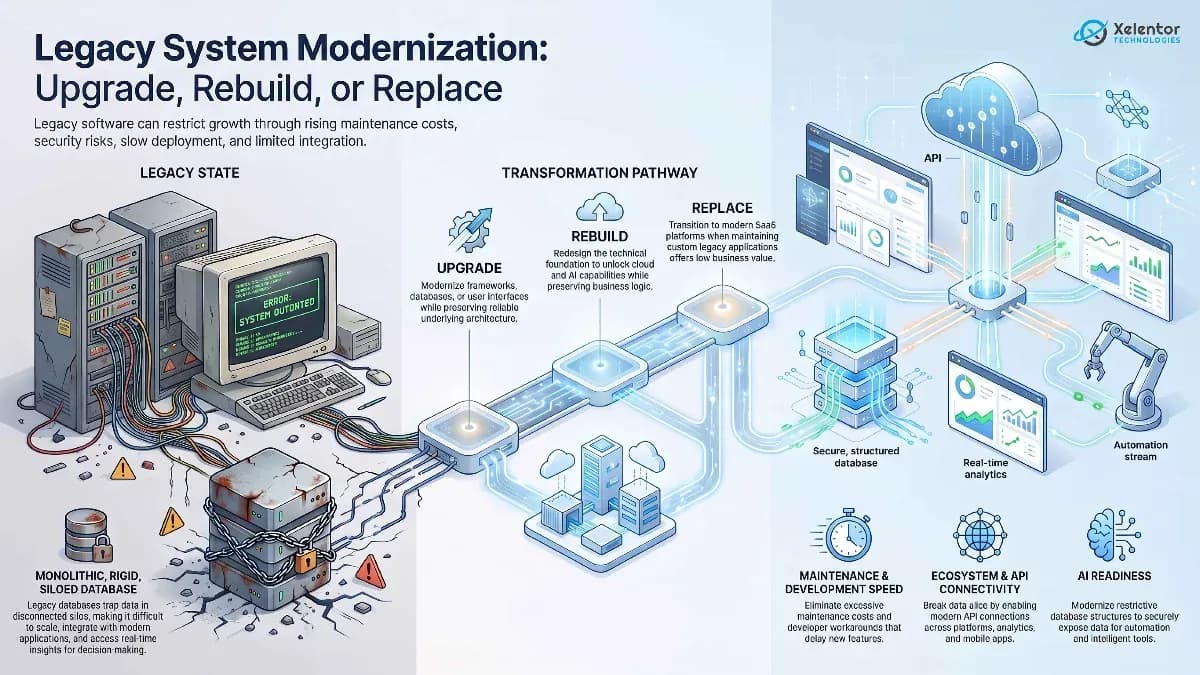
Modernization does not always mean throwing the system away. You can upgrade parts of it, reshape its architecture, rebuild it or replace it. The hard part is knowing which of those fits your situation. This guide helps you decide.
What is legacy system modernization
Legacy system modernization means improving old software, infrastructure or architecture so it can support what the business needs today.
Old does not automatically mean legacy. A system becomes a modernization concern when its technology starts to hold the business back. It may still do its main job perfectly well but be unable to connect to modern APIs, cloud platforms, mobile apps, analytics tools or AI services.
So the aim is not to make old software look new. It is to make it useful for the next five years of the business, not just the last five.
Signs your legacy software needs modernization
Look at these before the system turns into an emergency.
Maintenance costs keep increasing
If your developers spend more time fixing old problems than building anything new, that is the first sign. Small changes need a lot of testing because everything is tied to everything else.
When maintenance takes a growing share of the technology budget, it is time to look at options.
Integrations are becoming difficult
Your CRM, payment provider, mobile app and reporting tools all need to share data. If the old system cannot do that without custom workarounds, people end up copying data by hand.
Security is becoming harder to manage
Unsupported frameworks, old libraries and aging operating environments add risk. If key parts no longer get security updates, keeping the system safe becomes a project in itself.
Performance is affecting users
Software built for a smaller team and a smaller database slows down as both grow. Staff feel it first and customers feel it next.
Development has become too slow
A healthy system lets a team ship improvements without fear. If every feature takes far longer because developers must work around old design decisions, the technology is slowing the business down.
Upgrade, rebuild or replace
No single route suits every application. The right one depends on the state of the software and what the business needs from it.
When should you upgrade a legacy system
Upgrade when the core application still works well and only some technology needs attention. That could mean a newer framework, a better database, a move to the cloud, new APIs or a refreshed interface.
An upgrade keeps the business logic you have already paid for and is less disruptive than a rebuild. It makes sense when the system is reliable, the architecture can support further growth and the cost is reasonable. It will not fix a deep architectural problem, though.
When should you rebuild legacy software
Rebuild when the software still delivers real value but its foundation has become too hard to maintain. A typical case is an application with years of useful business rules on an architecture that cannot support cloud services, mobile access or modern integrations.
A rebuild is also a chance to leave behind features nobody uses instead of copying everything across.
When should you replace a legacy system
Replace when upgrading or rebuilding would add little value. Sometimes a modern SaaS product already does most of what you need. Sometimes the old system is so hard to maintain, so poorly supported or so insecure that keeping it is the bigger risk.
Replacement needs careful planning. Data migration, integrations, staff training and keeping operations running during the switch all need an answer before the old system is retired.
Legacy modernization approaches
You rarely have to do it all at once. Here are the approaches we use most, often in combination.
Application refactoring
Refactoring cleans up the internal structure of the code without changing what the software does. It makes the system easier to maintain and ready for later changes.
Cloud migration
Moving to the cloud can improve scalability and availability. But lifting an outdated application into the cloud as it is does not modernize its design.
API enablement
Adding APIs lets an old system talk to newer tools. It is often the quickest way to connect a CRM, a mobile app or an AI service without rebuilding the core.
Architecture modernization
A large monolith can sometimes be split into smaller parts, one at a time. Teams can then change one area without risking the rest.
User experience modernization
Sometimes the business logic is fine and the interface is the problem. Replacing the frontend can transform how the product feels while keeping the backend that already works.
We did exactly this for a B2B EHS software company in Ireland. Its web interface was aging and it had live customers who could not afford downtime. We moved it to Angular one screen at a time. The new screens and the older ones ran side by side on the same backend and the same permission model, so customers never saw an outage. You can read the full story in the EHS suite case study.
Legacy modernization and AI readiness
AI is giving companies a new reason to look at old software. Teams want smart search, document reading, automation and assistants inside the systems they already use.
AI needs access to good data and to the right functions. Isolated databases, missing APIs and inconsistent data all make that harder.
That does not mean every legacy system must be rebuilt for AI. The better question is whether your system can securely expose the data and functions that an AI project would need.
How to build a legacy modernization roadmap
Start by understanding what you have.
Assess the current application
Review the architecture, code, infrastructure, database, integrations, security, performance and dependencies.
Identify business priorities
Find which limits hurt the business most. It might be slow delivery, maintenance cost, security concerns, a poor user experience or missing integrations.
Decide what should be preserved
Not everything has to go. Business rules, valuable data and workflows that people trust are worth keeping.
Select the modernization approach
Choose between upgrade, refactor, rebuild, migrate, integrate or replace. Different parts of one system can need different answers.
Modernize in phases
For a large business application, small steps carry less risk. Start with the parts that matter most and keep the rest running while you work.
Measure the results
Track the things you wanted to improve: performance, maintenance effort, release speed, reliability, integrations and user experience.
Frequently asked questions
What is legacy system modernization?
Legacy system modernization is the process of updating outdated software, architecture, infrastructure or technology so it can better support current and future business requirements.
Should a business rebuild or replace legacy software?
It depends on the value of the existing application. If the business logic remains valuable but the technology is outdated, rebuilding may make sense. Replacement may be more appropriate when an existing modern solution can meet most business requirements.
Can legacy software be integrated with AI?
Yes, in some cases. APIs, middleware, data platforms and integration layers can connect legacy systems with AI services. However, systems with significant architecture, security or data limitations may require modernization first.
What are the benefits of legacy application modernization?
Potential benefits include improved maintainability, stronger security, easier integrations, better scalability, improved performance and greater ability to adopt cloud, automation and AI technologies.
Does legacy modernization require replacing the entire system?
No. Modernization can include upgrading specific components, refactoring code, introducing APIs, migrating infrastructure, modernizing the interface or gradually replacing parts of the application.