
Enterprise app modernization
Enterprise App Modernization Services
We move legacy .NET, desktop and on-premise systems to modern .NET and Azure in steps you can plan around.
NDA from the first meeting. You own the code from day one.
What we do
Systems we modernize
We start by understanding what you have and what it must keep doing.
Legacy .NET applications
Older .NET apps moved to modern .NET.
Desktop software
Desktop applications rebuilt for the web or modern platforms.
On-premise systems
Systems moved to Azure when that is the right step.
Databases and reports
Data moved safely and reporting made easier to use.
Old integrations
File transfers and one-off links replaced with clear APIs.
Interfaces
A modern frontend on top of software that still does its job.
Choosing a route
Upgrade, rebuild or replace?
The right route depends on the state of your system and what the business needs next. We show you the options before you decide.
| Topic | Upgrade | Rebuild | Replace |
|---|---|---|---|
| What it means | Move to a newer version of the same technology. | Build new software that does the same job. | Switch to an off-the-shelf product. |
| Best when | The system is sound but outdated. | The system limits what the business can do. | A standard product fits your process. |
| Change for users | Small. | Can be large but you can plan it in steps. | Large, because everyone learns a new tool. |
| Ownership | You keep your code. | You own the new code. | You depend on the vendor. |
| Main risk | Old problems come along. | It takes time to rebuild every feature. | The tool does not fit your process. |
How it runs
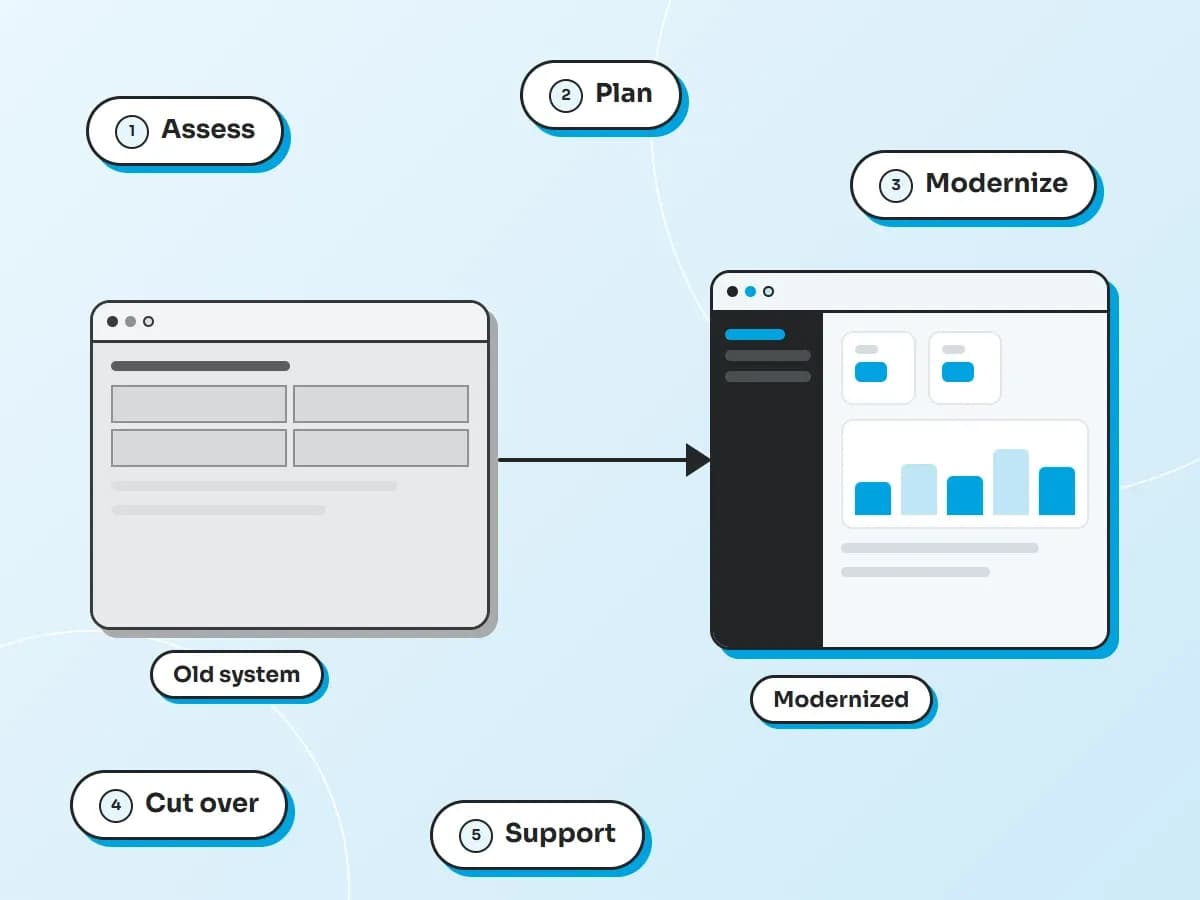
How a modernization project runs
Steps you can plan around, with the system kept running.
Assess
We review the system, the code and the data and list what must carry over.
Plan
A roadmap in steps, so the business can keep running.
Modernize
We upgrade or rebuild part by part, so each part is tested before the next one starts.
Cut over
We switch each part over when it is ready and agree the timing with you.
Support
Monitoring, fixes and updates after the move.
Why Xelentor
What you can count on
Your code, your IP
An NDA from the first meeting. You own the code from the first day of work.
Engineers who use AI tools
AI helps us read and document legacy code so planning is faster. Engineers decide what to keep, rewrite or retire.
The right team for this work
.NET is our core stack and Azure is our main cloud platform.
Technologies
The stack we use
Modern .NET and Azure as the target, with the tools your team already knows.





Data and cloud





Automation platform


AI platform


Explore more
Industries and related services
FAQ
Questions about enterprise app modernization
Should we upgrade, rebuild or replace?
We review your system and show you the options with the trade-offs. Then you choose. The right route depends on the state of the code and what the business needs next.
Can the system keep running while you modernize it?
We plan the work in steps so the business can keep using the system. Each part switches over when it is ready and we agree the timing with you.
Do you work with older .NET applications?
Yes. We move older .NET apps to modern .NET. We start by listing what the system does today so nothing is lost on the way.
Will we keep our data?
Yes. Moving your data safely is part of the plan. We check the data after each move before the next step starts.
Can you move us to Azure?
Yes. Azure is our main cloud platform. We can move on-premise systems to Azure in steps and set up the DevOps to run them afterwards.
Who owns the code?
You do. The new code is yours from day one and your original system stays yours.
Tell us what you are building
You will hear back from our team within one business day.