You do not have to replace your software to use AI. Most companies have spent years building up a CRM, an ERP, a customer portal or custom internal tools. Throwing those away to get AI would be expensive, disruptive and usually unnecessary.
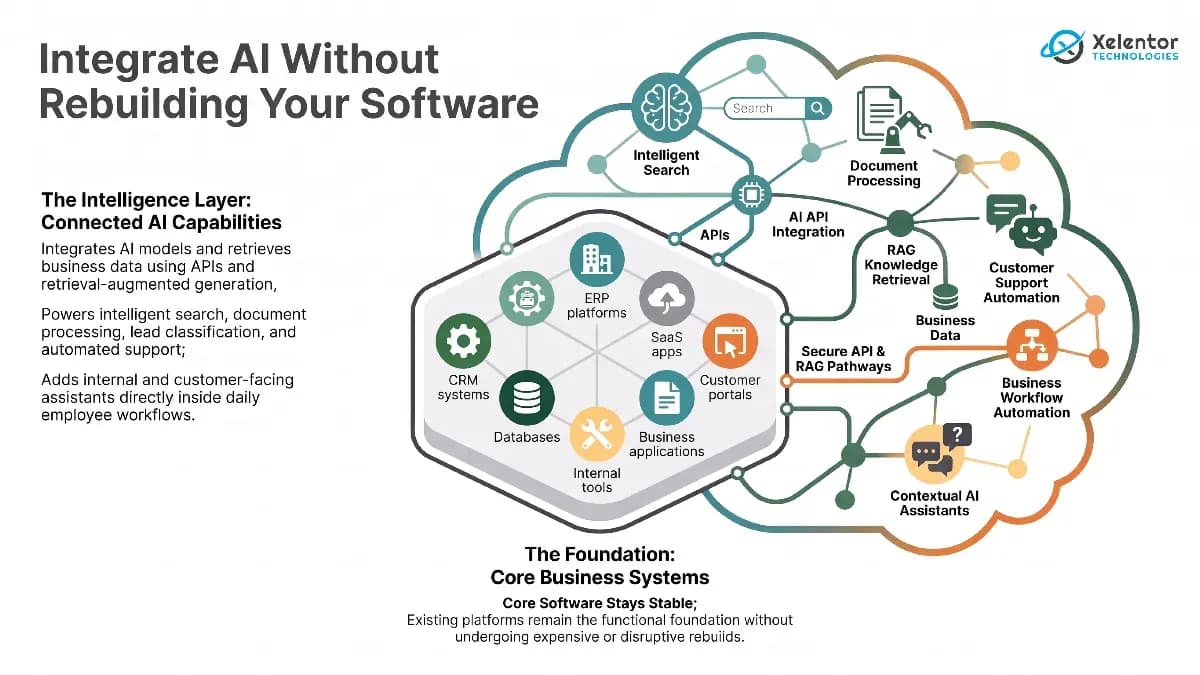
A more practical route is to add AI to what you already have, through APIs, AI models, automation and search over your own data, while the core applications stay as they are.
What does AI integration into existing software mean?
It means connecting AI capabilities to the software, data and workflows a business already uses. Instead of replacing a CRM, a company can add AI that summarizes customer conversations, sorts incoming requests, suggests next steps or helps staff find information. The same idea applies to ERP systems, SaaS products, healthcare applications and logistics tools.
The existing software stays the foundation and AI becomes an extra layer on top.
Why businesses are adding AI to existing systems?
A standalone AI tool means one more place for people to go. The bigger gain comes from putting AI inside the screens people already use: the support platform, the CRM, the document system. It also lets you start small, measure the effect and expand what works.
6 ways to integrate AI into existing business software
Connect AI through APIs
This is often the simplest route. A support system can send an incoming message to an AI model for classification or summary and show the result in the same screen. Staff keep working in familiar software and gain a new capability.
Add AI to existing business workflows
AI does not always need a new interface. It can sit inside a workflow. Sales can get summaries of past conversations. Finance can get documents and invoices classified. Support can get long threads summarized before escalation. Look for where people spend the most time and start there.
Connect AI with business data
AI is far more useful when it can see your approved information: documents, product data, policies, support records. Retrieval-augmented generation (RAG) lets an assistant look up the relevant material before it answers, so you do not need to train a model of your own. Data quality, permissions and access controls matter a great deal here.
Introduce AI into customer-facing applications
Web apps, mobile apps, SaaS products and portals can gain AI features without a rebuild, such as smarter search or contextual help based on approved company information. The test is whether the feature solves a real user problem.
A good example from our own work is a contractor compliance platform where AI reads compliance documents such as insurance certificates, qualifications and inductions, so staff do not retype them. You can read about it in the contractor compliance platform case study.
Combine AI with traditional automation
Rules handle predictable steps well. AI is better where the input needs interpretation. An AI model can read an incoming customer email and classify it. Ordinary automation can then create the ticket, assign the team, update the CRM and send the confirmation.
Build an AI layer around legacy software
An older system does not always have to go before you add AI. If it has usable APIs or its data can be reached securely, an integration layer can connect it. Not every legacy system is suitable, though. Outdated technology, serious security gaps, poor data or a locked-down design may call for modernization first.
What should businesses integrate first?
Start with a workflow that has a clear problem. Good candidates involve repeated document handling, finding information, classifying or summarizing text, customer messages or moving data between systems by hand.
Ask three questions before you begin:
- Does this process use a lot of employee time?
- Can AI improve it without unacceptable risk?
- Can we measure the result?
One focused use case makes it easier to judge accuracy, security, adoption, cost and value before you extend AI to other workflows.
Key challenges of AI integration
Data quality
Incomplete, outdated or duplicated data produces poor answers. Know what data the AI needs and whether you have it.
Security and privacy
AI may touch customer data, internal documents and databases. You need clear permissions, authentication and data handling rules, especially where regulation applies.
Integration complexity
Modern systems with good APIs are easier to connect. Older ones may need middleware, custom APIs or data pipelines. Assess what you have first.
Accuracy and human oversight
AI can be wrong or incomplete. Match the level of human review to the risk of the workflow and keep a person in the loop for high-impact decisions.
Cost and scalability
The model is only part of the cost. Count development, infrastructure, API usage, security, monitoring and maintenance too.
A practical AI integration roadmap
Step 1 identify the business problem
Start with a real operational problem, not with a technology.
Step 2 review existing software
Understand the architecture, APIs, databases, integrations and security controls.
Step 3 assess the data
Work out what information AI needs and whether it can be reached safely and reliably.
Step 4 select the right AI approach
It might be an AI API, a RAG setup, machine learning, intelligent automation or a mix.
Step 5 build a focused integration
Begin with one controlled use case rather than changing several systems at once.
Step 6 test and measure
Check accuracy, reliability, security, user experience, time saved and business impact.
Step 7 scale gradually
Expand once the first use case has shown real value.
Building AI around the software you already have
AI does not mean starting over. A CRM can gain lead analysis without being replaced. A SaaS product can gain smarter search without a rebuild. An internal tool can gain an assistant without a redesign.
The right setup depends on the system, the problem, the data and the risk. The aim is not AI everywhere. It is AI where it makes your existing software more useful.
Frequently asked questions
Can AI be added to software I already use?
Yes. In most cases AI can be added through APIs, automation layers or a retrieval system that works with your existing data, without rebuilding the application. How easy it is depends on the quality of your data and whether the software has usable interfaces.
Do I need to replace my legacy system before adding AI?
Not always. If the system exposes suitable APIs or its data can be accessed securely, an integration layer can connect it to AI services. Systems with serious security limitations or very poor data may need modernization first.
What is RAG and why does it matter for business software?
Retrieval-augmented generation (RAG) lets an AI application look up relevant information from your approved documents and data before it answers. It helps the answers reflect your own business information without training a new model.
Where should a business start with AI integration?
Start with one workflow that has a clear business problem, takes significant staff time and can be measured. Prove the value on real examples before expanding to other workflows.
How do I keep AI integrations secure?
Limit what the AI can access with clear permissions and authentication. Decide which data may be shared with AI services, keep a person in the loop for high-impact decisions and monitor the results.