Companies have been automating for years. An invoice goes out when a payment clears. A reminder goes out when a bill is late. Nobody retypes data from one system into another. It works. It is not going away.
AI agents are a different kind of tool. Instead of following a fixed path, they read the situation, decide what to do and carry out several steps on their own. That raises a fair question: do you keep your current automation or move to agents?
In practice most businesses need a bit of both. Reaching for an agent when a simple rule would do is a common mistake. This guide explains how to tell the difference.
What is traditional automation?
Traditional automation runs on rules you write in advance. If this happens, do that. A customer places an order and a confirmation email goes out. Every time, the same way.
It works best when the process is predictable, repetitive and uses structured data. Typical examples are:
- Sending automated emails
- Generating invoices
- Updating CRM records
- Processing routine transactions
- Sending payment reminders
- Synchronizing business data
- Generating scheduled reports
Its strength is predictability. Once it is configured and tested it does the same thing every time. You always know what it will do.
What are AI agents?
An AI agent works from context. It reads information, works out what needs to happen, uses the tools it is connected to and takes several steps to get there.
Take a customer who writes that a payment was taken but their subscription is still inactive. A traditional workflow will pass that on to support. An agent can read the message, check the payment, look at the subscription status, spot the likely cause and start the right fix.
That ability to cope with messy, changing input is the real difference between the two.
AI agents vs traditional automation
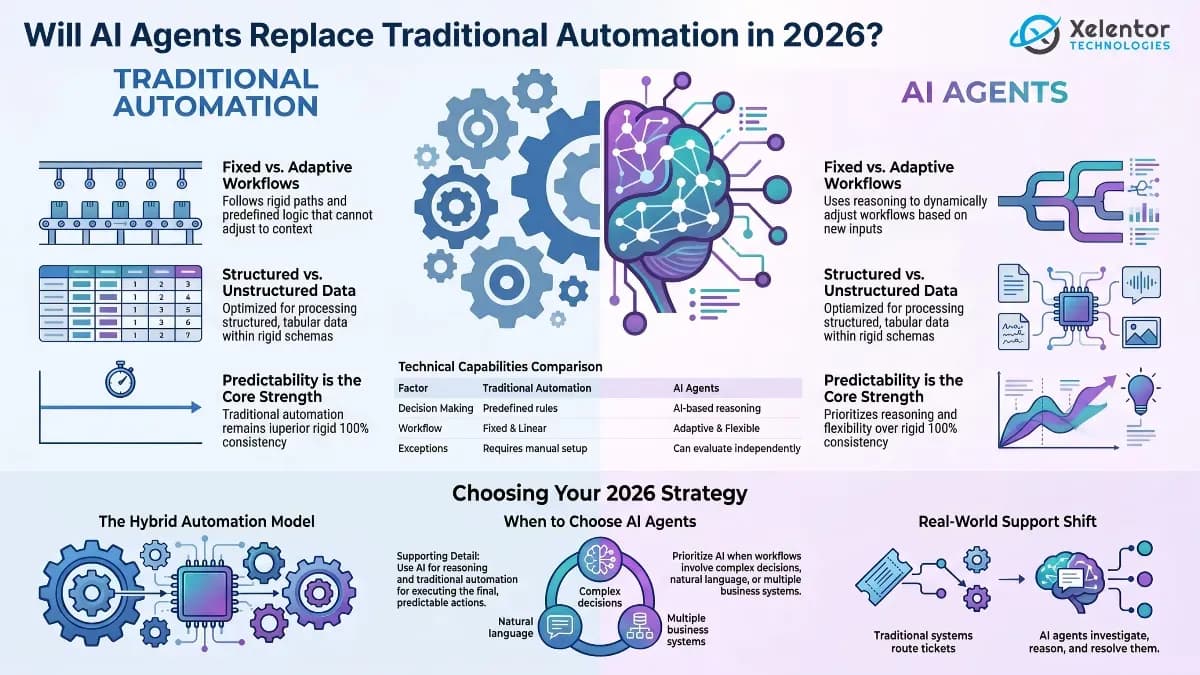
| Factor | Traditional Automation | AI Agents |
|---|---|---|
| Decision making | Predefined rules | AI-based reasoning |
| Workflow | Fixed | Adaptive |
| Data | Structured | Structured and unstructured |
| Changes | Requires workflow updates | Can adapt to changing inputs |
| Complexity | Predictable processes | Complex multi-step processes |
| Exceptions | Predefined handling | Can evaluate certain exceptions |
| Implementation | Generally simpler | Needs more design, testing and oversight |
| Monitoring | Straightforward | Requires stronger observability |
Neither is better in every case. The right choice depends on the process in front of you.
When traditional automation makes more sense
Not every workflow needs AI. If the rules are clear and the outcome is predictable, a plain automated workflow is cheaper, faster and easier to trust. Sending an invoice after a successful payment is a good example. There is nothing to reason about.
Traditional automation is the right fit when:
- The process follows clear rules
- The workflow rarely changes
- The information is structured
- The expected outcome is predictable
- Consistency is important
- The task is repetitive
Putting an agent into a job like that adds cost and a new way for things to go wrong, with nothing gained.
When businesses should consider AI agents
Agents start to pay off when conditions change, decisions are complicated or the input is unstructured.
Think about purchasing. A rule can raise a purchase request when stock falls below a set level. An agent can also look at supplier performance, past orders, current demand, price and delivery times before it decides what to do next.
Consider an agent when a workflow involves:
- Complex decision making
- Unstructured information
- Multiple business systems
- Changing conditions
- Natural language interactions
- Frequent exceptions
- Multi-step processes
7 business use cases for AI agents
Customer support
Agents can read a customer request, pull the relevant information and help resolve the issue across connected systems.
Sales operations
They can help qualify leads, review customer information, update CRM records and draft follow-ups.
IT operations
They can read alerts, look into likely causes, check logs and run agreed fixes.
Finance operations
They can assist with invoice processing, expense checks and reconciliation. They can also flag the exceptions for a person.
Human resources
They can support onboarding, answer internal questions and coordinate routine HR tasks.
Healthcare administration
They can help with appointment coordination, document processing and routing information, as long as privacy is protected and a person stays in charge.
Business intelligence
They can look through business data, spot trends, produce reports and help teams answer specific questions.
AI agents can work with traditional automation
You do not have to pick one. In most real projects the strongest design uses both.
Let the agent do the thinking and let the rules do the doing. An agent reads a customer request and decides what is needed. Ordinary automation then updates the CRM, creates the ticket, sends the email or triggers the approval. The agent is flexible where flexibility helps. Everything it triggers stays predictable and easy to audit.
Key challenges of AI agent implementation
Agents can be valuable. These are the things to settle before you build one.
Security
An agent can touch business systems and sensitive data, so access controls and permissions matter from day one.
Governance
Decide what the agent may access and which actions it may take on its own and which need approval.
Monitoring
You should be able to see what an agent did, why it did it and where a workflow went wrong.
Reliability
Important workflows need checks, safeguards, fallback steps and human oversight where the stakes are high.
Integration
An agent is only as useful as its connections. It needs secure access to your CRM, databases, APIs and internal tools.
Choosing the right automation strategy
Start with the business problem, not the technology.
If the workflow is predictable and rule-based, use traditional automation. If it needs interpretation, judgment or coordination across several systems, an agent may be worth it. For many companies the answer is a mix of the two.
Rules give you consistency and control. Agents give you reasoning and adaptability.
The goal is not to use the newest technology. It is a setup that works reliably, grows with you and is safe to run.
Frequently asked questions
What is the difference between AI agents and traditional automation?
Traditional automation follows predefined rules, while AI agents can understand context, reason about tasks, make decisions and interact with connected tools.
Are AI agents better than traditional automation?
Not always. Traditional automation is better for predictable tasks, while AI agents are more suitable for complex workflows that require reasoning and adaptability.
Can AI agents and traditional automation work together?
Yes. AI agents can handle decision making while traditional automation manages predictable actions such as system updates and notifications.
When should a business use AI agents?
Businesses should consider AI agents when workflows involve complex decisions, unstructured information, multiple systems or frequent exceptions.
Are AI agents expensive to implement?
Costs depend on the AI models, integrations, infrastructure, security requirements and complexity of the workflow. Businesses should evaluate potential ROI before implementation.