
Moving leads in the CRM within minutes, with no manual entry
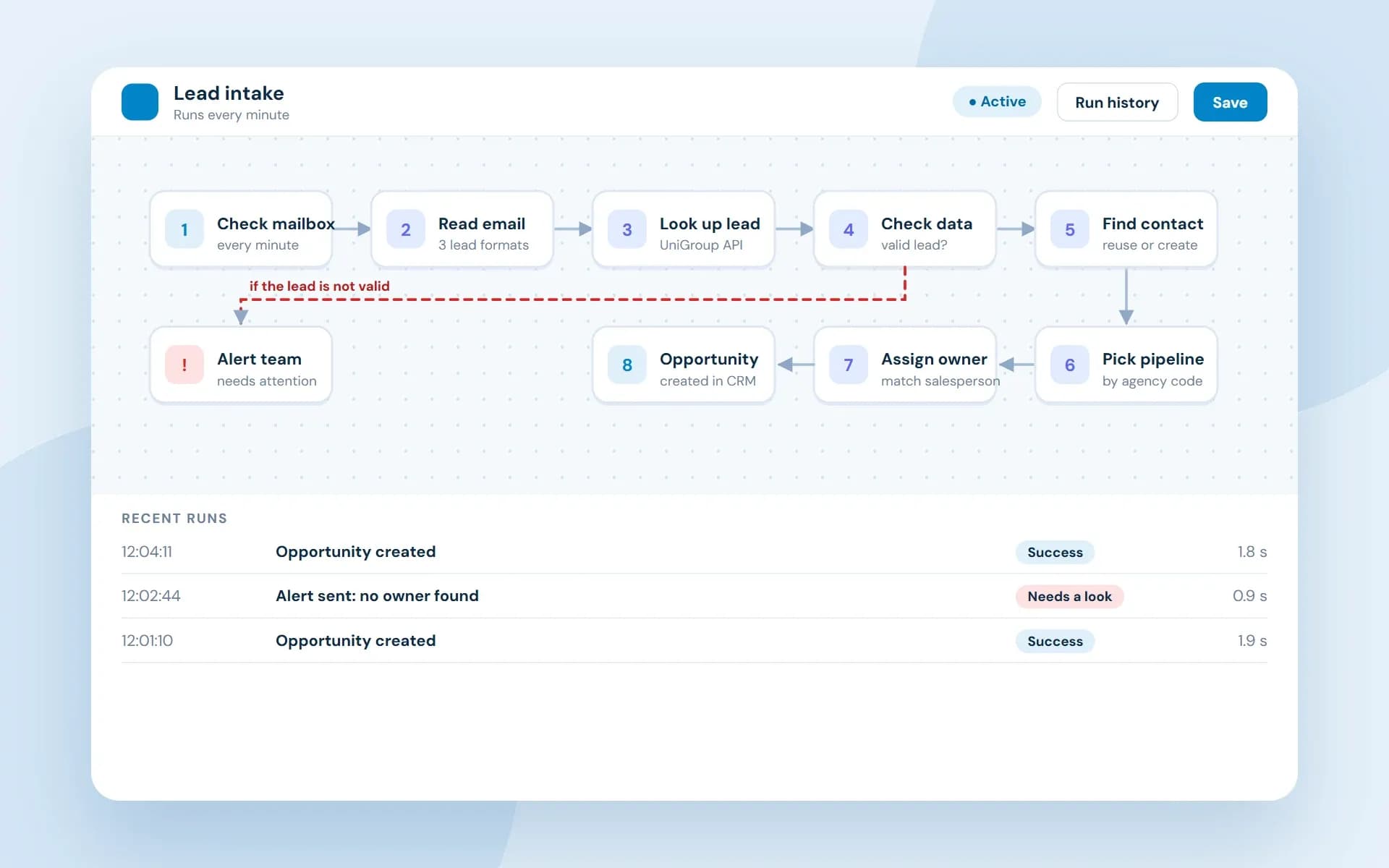
A moving company in the United States received its lead alerts by email and typed each one into its CRM by hand. We built an automation that reads every email, checks it against UniGroup and creates the contact and opportunity in GoHighLevel.
The situation
Every lead email meant manual copying.
Lead alerts for survey bookings arrived by email. For each one, someone had to find the lead in UniGroup and move the details into the CRM by hand.
Each email also meant checking for duplicate contacts, choosing the right pipeline for the agency and assigning a salesperson.
Slow data entry
Look up the tracking number in UniGroup, then copy the customer and move details into the CRM by hand.
Errors and duplicates
Typing mistakes and contacts entered twice were easy to make.
Leads could be missed
With no check on the process, a lead could slip through without anyone noticing.
Our approach
Messy emails, reliable outcomes.
The emails come in several formats, some tracking numbers contain letters and the salesperson's name appears in different places. Outlook also never re-fetches an email once it has been checked, so a failed email is not retried on its own.
Know each format
The parser recognizes each email format before it reads anything.
Flexible reading
It accepts tracking numbers with letters and tries several patterns to find the salesperson.
Check before writing
Bad data is caught before any CRM record is created.
Every email ends with an outcome
Each email reaches a definite result and anything unprocessed triggers an alert for manual handling. An email is marked read only once its outcome is final.
Technology
What it is built with
A cloud-based workflow that runs in the background with no user interface. n8n runs the steps in JavaScript, with the Microsoft Outlook API for mail and the UniGroup and GoHighLevel APIs for the data.
- n8n
- JavaScript
- Microsoft Graph API
- OAuth2
- UniGroup GraphQL API
- GoHighLevel REST API
Results
What changed for the client.
Before → after
From copying to automatic.
Each manual step now happens on its own, with an alert when something needs a person.
Typing each lead by handLeads in the CRM in minutes
Every lead email becomes a contact and an opportunity automatically.
Searching UniGroup for each leadAutomatic lookup
The tracking number is looked up through the UniGroup API.
Contacts entered twiceReused contacts
Existing contacts are found first, so new ones are created only when needed.
Choosing the pipeline by handRouted by agency code
Each agency code maps to the right pipeline and stage.
Assigning a salesperson by handOwner matched
The salesperson named in the email is matched to a live user and assigned.
Leads that could slip throughAn alert every time
Anything that cannot be fully processed triggers an alert for the team.
Related
More about this kind of work
Logistics software
Tracking, dispatch, driver apps and warehouse tools.
See the industryWorkflow automation
Automate repetitive work with n8n across your tools, from approvals to routing and reports.
See the serviceCustom software development
Business platforms, client portals and internal tools built around how you work.
See the service
Tell us about your project
You will hear back from our team within one business day.