
Self-service portal where freight customers track shipments and invoices
A logistics company had customers who had to ask its team for shipment status, estimates, invoices and documents. We built a branded customer portal so they can find it all themselves.
The situation
Every answer meant a call.
Customers had no self-service access to their logistics data. To see shipment status, estimates, invoices or documents, they had to contact the client's team.
Every question was a request
Customers contacted the team for shipment status, estimates, invoices and documents.
Staff looked everything up
Operations and finance staff searched the freight platform for each answer.
One portal for many customers
Each customer needed its own branded view, with its own users and permissions.
Our approach
One portal for every customer, kept fast.
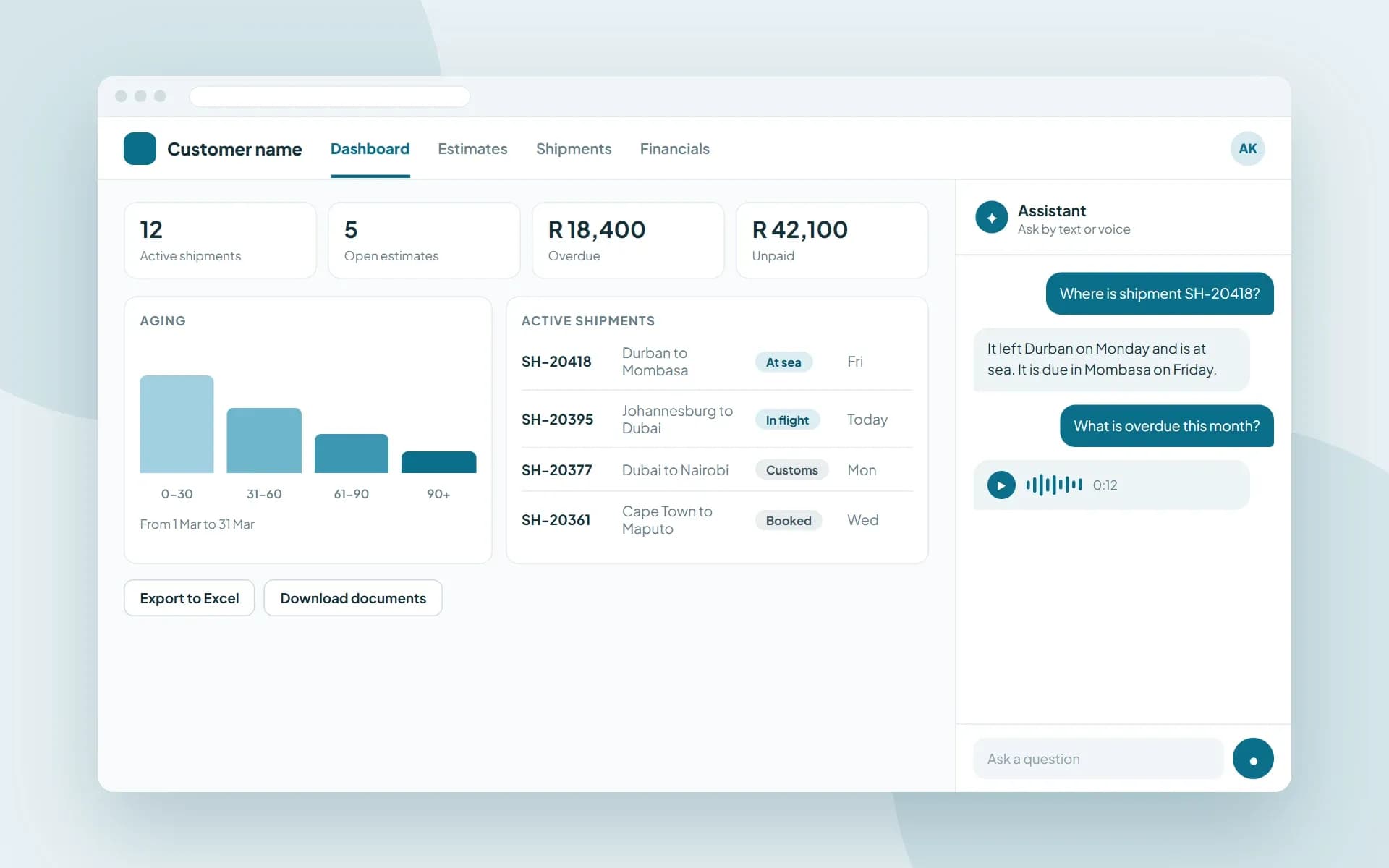
Each customer needed its own branded view of its freight data, with its own users and permissions. The Financials page also had to load quickly.
A branded portal for each customer
Each customer is recognized by its web address and loads its own logo and branding. Customers invite their own users, with role-based access to Estimates, Shipments and Financials.
A fast Financials page
We rewrote the query to find only the latest record for each invoice, turned row-by-row calculations into inline logic and added indexes. A From Date and To Date picker calculates the KPIs and aging for the chosen period.
An assistant that answers
An assistant answers questions about shipments, estimates and invoices as text or voice, using Azure OpenAI and Azure AI Speech.
Technology
What it is built with
A Blazor WebAssembly app on an ASP.NET Core Web API, with ASP.NET Core Identity for sign-in, Microsoft SQL Server for the data. Azure OpenAI and Azure AI Speech sit behind the assistant.
- .NET
- Blazor WebAssembly
- ASP.NET Core Web API
- ASP.NET Core Identity
- Entity Framework Core
- Dapper
- AutoMapper
- ClosedXML
- Microsoft SQL Server
- Azure OpenAI
- Azure AI Speech
Results
What changed for the client.
Before → after
From asking to seeing.
Customers find the answers themselves, in their own branded portal.
Asking the team for statusShipments, any time
A shipment list with details, an event timeline and route tracking.
Waiting for an estimateEstimates online
A list with details, costing and documents for every estimate.
Asking finance for invoicesFinancials online
Account figures with overdue, unpaid and paid transactions and aging. Lists export to Excel and documents download.
One look for every customerTheir own branded portal
Each customer is recognized by its web address and loads its own logo and branding.
Staff creating every userCustomers invite their own users
Invites with role-based access to Estimates, Shipments and Financials.
Calling for answersAsk by text or voice
An assistant answers questions about shipments, estimates and invoices as text or voice.
Related
More about this kind of work
Logistics software
Tracking, dispatch, driver apps and warehouse tools.
See the industryCustom software development
Business platforms, client portals and internal tools built around how you work.
See the service.NET development
Business platforms, APIs and apps on .NET and Azure.
See the technologyAI chatbot development
Assistants that answer from your own data, for customers and teams.
See the service
Tell us about your project
You will hear back from our team within one business day.